
How it works — make the surface, get the trap screen, decide · GeomodL
Scope a study
How it works

Make the surface. Get the trap screen. Then decide.

Three steps from the data you actually have to a ranked inventory of the traps it holds. The first two cost nothing and commit you to nothing. The third is a study, if the screen earns one.

Make your surface in Imagio ↗ What the trap screen contains ↓ Your source data never leaves your computer. A surface reaches us only when you press send on it.
1 · Make the surfaceImagio, in your browser, on your machine. Any format, as many surfaces as you like.Free · no account for the demo
2 · Send the one that mattersOne click in the app. We run Præsagio on it and return the trap screen.Free · no obligation
3 · Form your opinionIf the screen shows something worth chasing, scope a study: depth, risked targets, development, value.Fixed scope · fixed fee · weeks
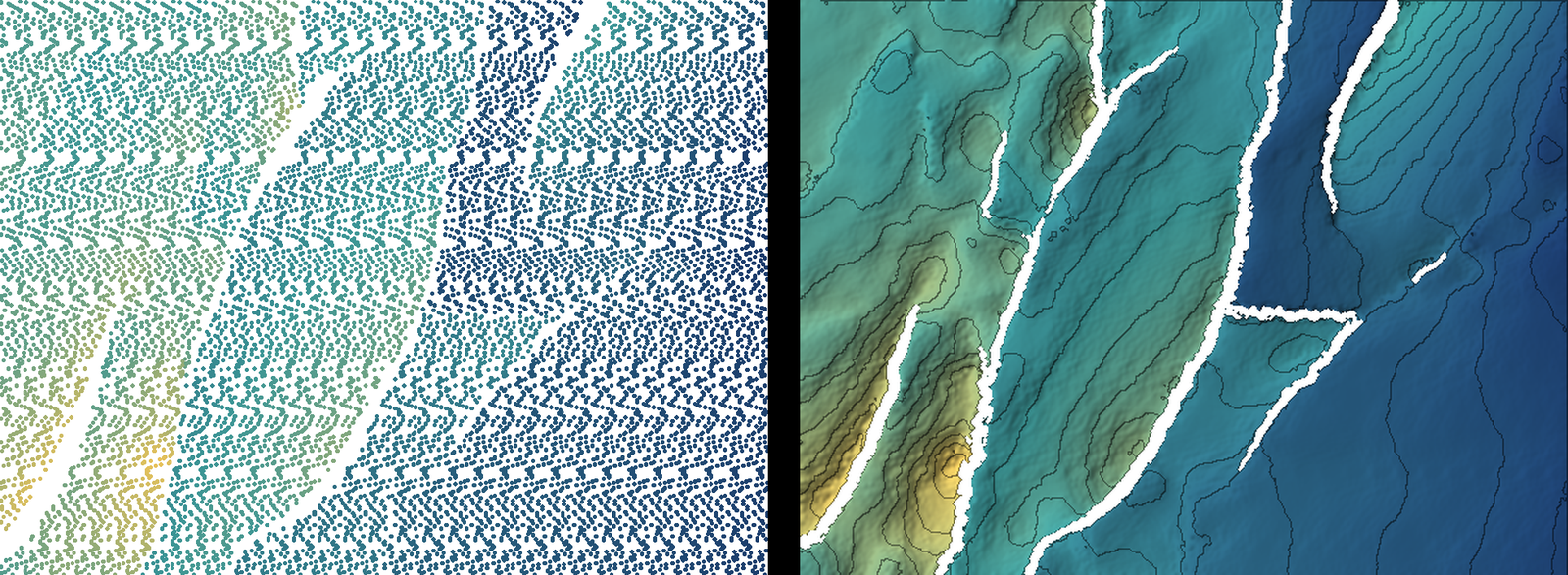
Imagio: scattered horizon picks on the left, the fault-cut surface it produced on the rightImagio · demo point set · 25 m grid · faults reconstructed from throw
STEP 01

Make the surface — from whatever you have.Imagio, on your own computer. Nothing is uploaded.

Seismic horizon picks with fault sticks, an orphan interpretation without the sticks, a legacy point set where the gaps are the faults, a ZMAP+ grid or a GeoTIFF. Imagio turns it into one clean, light fault-cut surface: faults reconstructed where they're missing, breaks classified, corridors cut rather than smeared.

Make one surface or twenty; change the grid, the fault merge, the corridor; export GeoTIFF, ZMAP+ or EarthVision and use them wherever you like. Try it on the demo datasets first — no account — then sign in with a corporate email for your own data.

hands off → Grid Pack · fault-cut surface + fault traces + manifest.json · Petrel-ready ZMAP+ / EarthVision
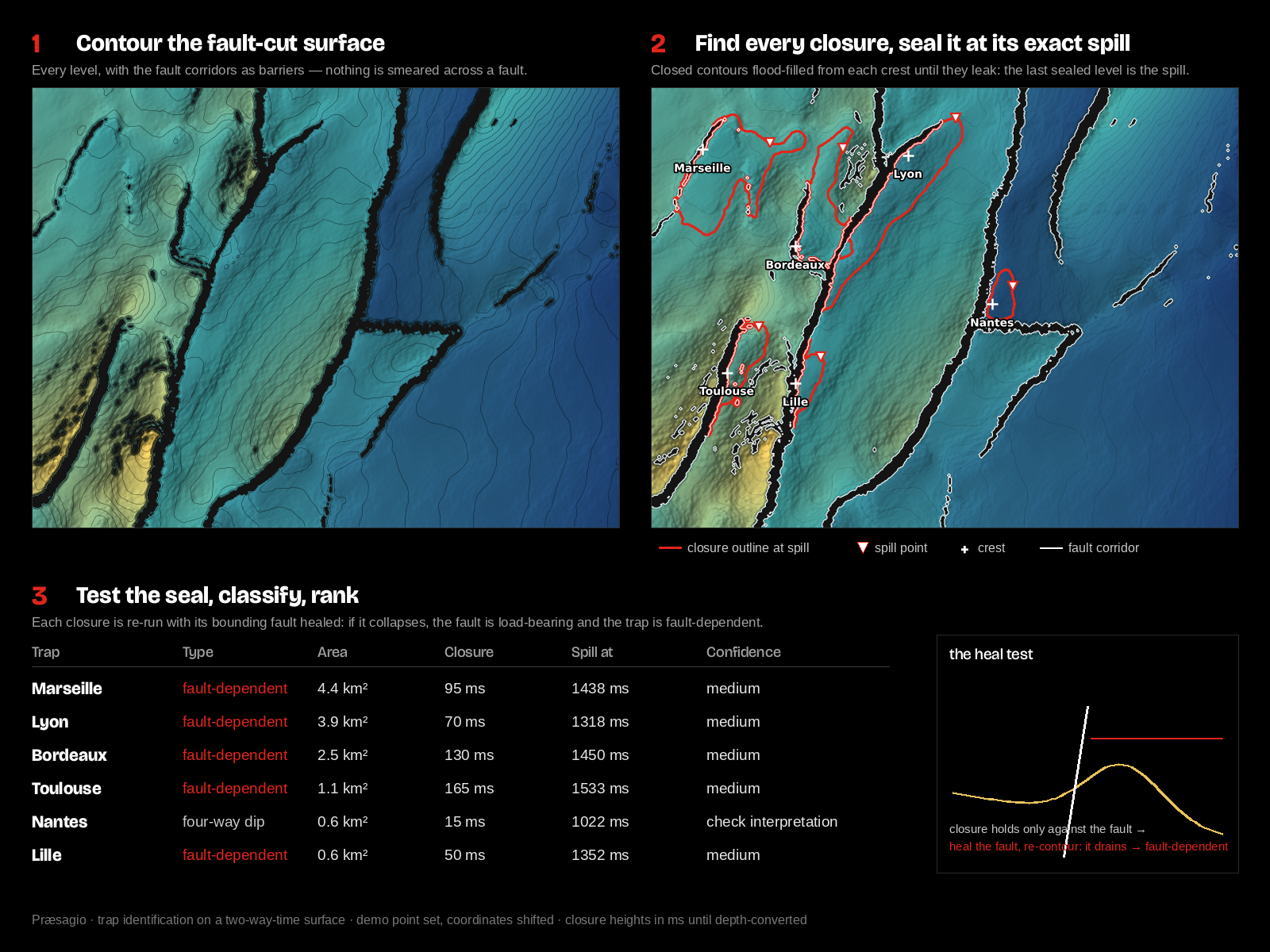
How Præsagio works: contour the fault-cut surface, find every closure and seal it at its spill, test the seal and rank
STEP 02

Send the one that matters. We run Præsagio on it — free.Returned within a few working days.

When a surface looks like it might be hiding something, press Send for a free trap screen on it in the app. That surface — and only that one — comes to us with its fault traces and your project details. We run it through Præsagio, our trap detection engine, and send you back the trap screen.

We run it in the domain the surface is in. Most interpretations arrive in two-way time, and that is fine for what a screen is for: the structure is the structure. Where time and depth part ways is in the numbers — closure height in metres, and therefore volume — and we would rather say that plainly than hand you a figure that moves the moment a velocity model is applied.

What a time-domain screen can and can't tell you

Where the closures are, and their outlinesStructural closure doesn't depend on the velocity field unless it varies laterally across the closure.
Spill points, sealed at their exact leakThe spill is a geometric property of the surface, found in time as well as in depth.
Closure areas, fault dependence, crest positionMap-plane quantities, and whether a trap relies on a fault to seal is read from the surface.
A ranking — what's worth a second look, what's an artefactWhich closures look geological, which look like the interpretation.
Closure height in metres, unrisked volumesNeed the depth surface. Conversio produces hundreds of depth realisations from one velocity point — the first thing a study does.
Probability of success, targets, development, valuePunctio, Maturatio and Estimatio — the rest of the pipeline, the rest of the study.
  • A map: every closure the surface can hold, sealed at its spill
  • A one-page inventory: closures ranked by area, spill point, crest, fault-bounded or four-way, fault provenance
  • A short opinion: what looks geological, what looks like the interpretation, and what we'd do next

Already in depth? Then the screen includes closure heights and a first-pass volume. Either way, a surface reaches us only when you send it — the data-handling notice says exactly what happens to it.

The study · what the screen can't give you
Conversio — depth surface, hundreds of realisations, defendable at the well
Præsagio — the full prospect portfolio with unrisked volumes, across every surface
Punctio — probability of success, risked volumes, drilling targets
Maturatio — conceptual development, monthly production profile
Estimatio — project economics under your fiscal terms, company valuation
Report, deck, workbook and re-runnable packages. Strategic partners can take the engines in-house afterwards.
STEP 03

Form your own opinion. Then scope a study — or don't.Fixed scope, fixed fee, two to six weeks.

The trap screen is yours. Take it to your team, put it against what you already believe about the block, and decide. If it shows nothing, you've lost a click. If it shows something, you know exactly what the study would be for.

A study takes the surface the rest of the way: Conversio's depth realisations put metres and volumes on the closures; Punctio risks them and clusters what one well can test; Maturatio runs the field from first oil to licence end; Estimatio prices it under your fiscal terms and rolls it up to what the block is worth — with every step handed back as a package your team can re-run.

Before you press send

Questions people ask first

Do I have to send anything at all?
No. Imagio is useful on its own; make surfaces and export them for as long as you like. The screen is there for the one surface you want a second opinion on.
What exactly leaves my computer?
Nothing until you press send. Then that surface, its fault traces, its grid statistics and your project details — not your source data, not your other surfaces. The app also sends run diagnostics (formats, sizes, timings, errors) so we can improve Imagio; those contain no coordinates, depths or names.
My surface is in time. Is the screen still useful?
Yes, for what a screen is for: where the closures are, where they spill, how big they are in the map plane, whether they rely on a fault. What it won't give you is closure height in metres or a volume — those need depth, which is the first thing a study does.
My surface is already depth-converted.
Then the screen includes closure heights and a first-pass unrisked volume for each trap.
I have several horizons over the block.
Send the one you'd drill on. A stacked portfolio across several surfaces — with the shared-well clustering that makes it worth something — is what a study does.
Who sees it?
The people who run the screen, and nobody else. It is not shared, sold or reused, and it is deleted on request. The data-handling notice you accept when you create an account is the whole agreement — one page, no signature.
Start here

If your subsurface data is messy, that is exactly the data Imagio was built for.

Make the surface on your own machine. Send the one that matters. See the traps it holds before you decide anything.

Make your surface in Imagio ↗Scope a study